Business Central ER Diagram Editor
Map Business Central table relationships in minutes, generated straight from real AL metadata. The Base Application is pre-loaded, or upload your own extension’s .app file. No manual data entry.
Free · Runs in your browser · Nothing to install
This interactive tool needs a larger screen. Open this page on a desktop or laptop to launch it.
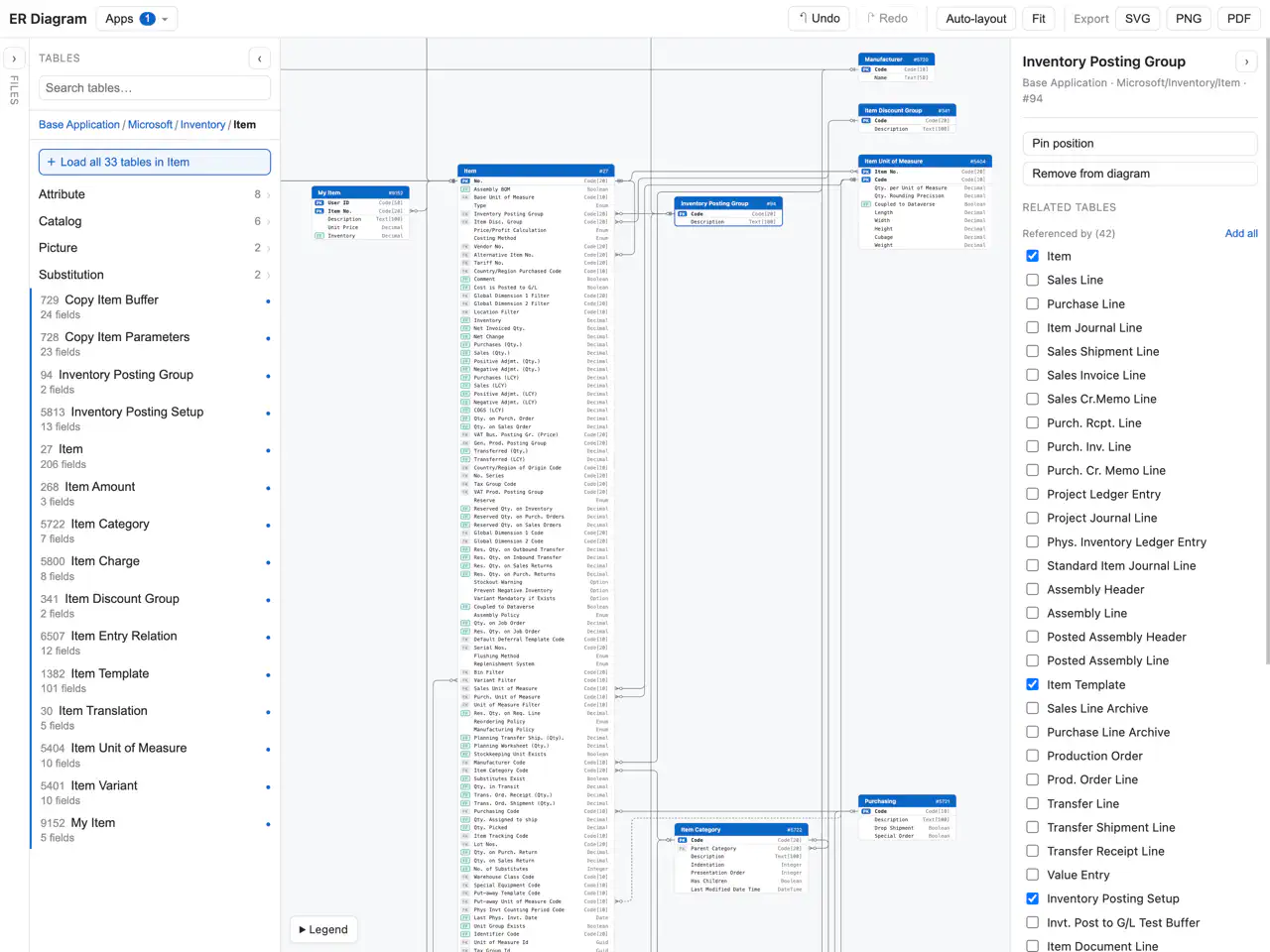
The Business Central ER Diagram tool is free online visualisation software for creating Entity Relationship Diagrams from compiled AL packages. Click ‘Launch the free editor’ above to get started with one of the built-in sources, or upload your own extension. The pre-loaded ‘Base Application’ source covers Business Central’s finance, inventory, warehousing, projects and other core functionality.
Load multiple extensions at the same time to map their dependencies between tables, flowfields and enums. For large tables, you can choose to only display relevant fields to simplify the diagram. The tool automatically draws the connections between nodes using standard Entity Relationship Diagram symbols and displays their data types.
Key terms
Table Relation
A column that is marked as a table relation uses a primary key field (such as a code or number) to reference another entity. In Business Central, these can be conditional based on another field, allowing one column to reference more than one table. These are the dashed lines you see in the Business Central ER Diagram.
Flowfield
These are calculated fields that Business Central computes based on data in other tables. A flowfield formula uses one of 7 operators: Sum, Exist, Count, Average, Min, Max, or Lookup. They are aggregated conditionally either statically using constants or dynamically based on record values or FlowFilters that can be modified at runtime. The operator used by the formula is shown as a badge on the connecting line between the field and the related table.
Enum
Enums are their own objects in AL source code. They can be used by multiple tables and extended by other extensions. When unset, they have the blank “zero” value determined by the enum definition.
Option
Similar to enums, they define a set list of enumerated values a field can be set to. However, unlike enums, they are defined on the field themselves, so they cannot be referenced or extended by another extension. In the Business Central ER diagram, an option type can therefore only be referenced by a single field.
How it works
Pick an included app or upload your own
Relationship data for the Base Application is already pre-loaded; upload your own
.appfile to add any custom extension.Search or browse to a table
Use the cross-app search, or browse the namespace tree (e.g.
Microsoft/Sales/Document). Select a table to drop it on the canvas.Select tables & columns
Choose which related tables, FlowFields and conditional relationships to show, and trim large tables down to just the relevant fields.
Arrange it
Drag tables to customise the layout of your diagram, or use auto layout and get perfectly arranged tables in one click.
Export and save
Download your finished diagram as a PNG, infinitely scalable SVG, or PDF.
What it supports
- Real AL metadata
- Use published extension artifacts to get the table data and relationships of any app on AppSource. No need to enter data by hand.
- Standard and extension apps
- Developing a new extension for a client? Show how it relates to Microsoft’s built-in tables by including tables from across standard and custom extensions.
- Cross-app relationships
- Reason about complex, multi-app data structures by selecting multiple applications and see the relationships between them.
- IE crow’s-foot notation
- Required and optional table relations are clearly distinguished (
||vs.o|), and conditional / polymorphic relation paths are displayed as dashed lines. - Tables, fields, enums, options, FlowFields
- Display as much or as little as you need, include information about flowfields and option values to give a clearer picture of the data structure.
- Free export
- Download your finished diagram as a printable export. Customise the display ratio for portrait or landscape printing.
Use cases
Onboarding to an unfamiliar Business Central database
Visualise the underlying data model that drives the design, workflow and functionality of the system to understand the dependency and integration surface.
Documenting an extension's data model
Upload your own
.appand generate an ER diagram of your tables, including how they hook into standard BC tables. Export the result into your repository or documentation.Planning a migration or integration
Get the documentation you need to map Business Central’s data model to your existing system. Find the tables you need to populate to create a new integration or synchronization layer.
Explaining a relationship in a spec or PR
Create clean, readable documentation for your client-facing proposals and design documents. Communicate your extension design to other developers.
Frequently asked questions
Is the Business Central ER diagram editor really free?
Yes. The editor and all exports are free to use. It runs in your browser, so there is nothing to download or install.
How do I diagram my own extension?
Upload the compiled .app package for your extension. The tool reads the table definitions and relationships from the AL metadata inside it, so there is no manual data entry.
Can I show how my extension relates to standard Business Central tables?
Yes. Load your extension alongside the pre-loaded Base Application and the editor draws the relationships between your tables and Microsoft’s built-in ones.
What export formats are supported?
PNG for quick sharing, infinitely scalable SVG, and PDF for printing. You can adjust the display ratio for portrait or landscape output.
Which relationship types does the diagram show?
Table relations (including conditional and polymorphic ones, drawn as dashed lines), FlowField formulas with their operator shown on the connecting line, and enum and option usage, all in IE crow’s-foot notation.
Related
Ready to map your data model?
Free · Runs in your browser · Nothing to install
From the team behind Skuno
This free tool is a small piece of what we work on. Skuno is a standalone retail operations platform (POS, warehouse management, order management and real-time BI) that integrates with Business Central.